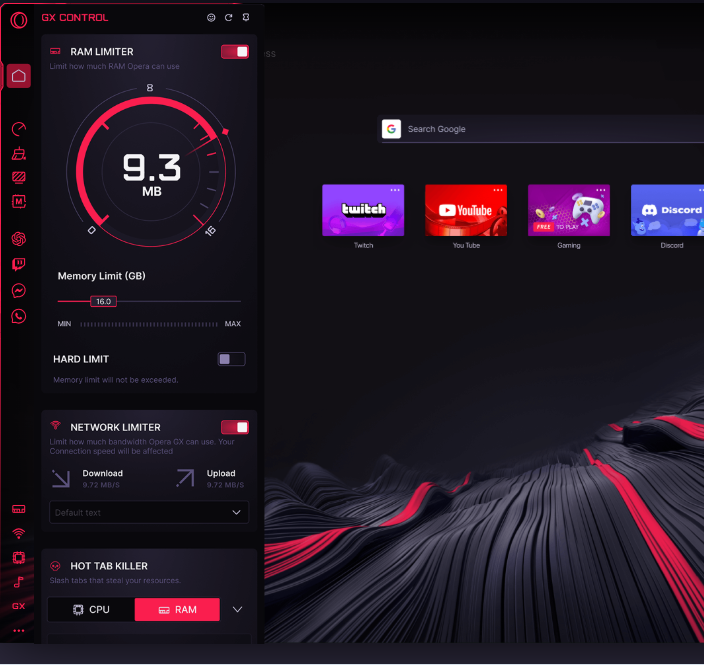
Set exact RAM, CPU & Network limits.
Your game gets priority. Always.
Control memory usage
Prioritize your game
Stable connection
Test Setup: Call of Duty Warzone | High Settings, 1440p | i7-10700K, RTX 3070, 16GB RAM
| Metric | Chrome | Opera GX | Gain |
|---|---|---|---|
| Browser RAM Usage | 2.8GB | 0.8GB | -71% |
| Game RAM Available | 13.2GB | 15.2GB | +2GB |
| Average FPS | 142 | 168 | +26 |
| 1% Low FPS | 98 | 145 | +47 |
| Ping (Stable) | 25ms | 18ms | -28% |
| Ping (During Download) | 200ms | 19ms | -90% |
| Stutters per Hour | 12 | 1 | -92% |
See which tabs use the most resources. Kill them in one click.
High usage, few tabs?
See which tab is the culprit
System lagging?
Kill heavy tabs instantly
Need max performance?
Clear non-essentials in seconds
Max FPS, stable ping
Game + OBS + browser
Maximize limited resources
Maximize high refresh
30s install. No payment. Just more FPS.
111M subscribers
"I downloaded it, I've been using it and I love it. It's great!"
15M subscribers
"If you improve your KD while using Opera GX, it's probably not a coincidence."
3M subscribers
"Boys, Opera GX will change your life"
"The solution for gamers who want max frame rates."
"Features work as advertised. Impressive variety."
"Your PC can focus on gaming, not the browser."
Simple setup. Immediate results. No technical knowledge needed.
Quick download. Auto-imports your bookmarks.
Click the speedometer icon in sidebar.
Drag sliders to fit your system.
GX Control runs automatically.
Yes, Opera GX is completely free to download and use. There are no hidden fees, subscriptions, or premium tiers. All features including the VPN, ad blocker, and gaming limiters are included at no cost.
No – quite the opposite. Opera GX is designed to improve gaming performance. The CPU, RAM, and Network limiters let you control exactly how many resources the browser uses, leaving more for your games.
Absolutely. Opera GX makes it easy to import bookmarks, passwords, and browsing history from Chrome, Firefox, Edge, and other browsers with just one click during setup.
The built-in VPN provides basic privacy protection and works with most websites. For heavy streaming or specific geo-restrictions, you may want to consider a dedicated VPN service.
Opera GX uses the Chromium engine, which means it supports all Chrome extensions from the Chrome Web Store. You get the same compatibility with added gaming features.
Click the Easy Setup button in the sidebar to access theme options. You can choose from preset themes, adjust colors using the RGB picker, or enable dynamic color that syncs with your screen content.